• Skip to primary navigation
  • Skip to main content
  • Skip to primary sidebar
TheWayoftheWeb

TheWayoftheWeb

Content and Digital Marketing Specialists

  • Blog
  • The Cipher
  • About Us
    • Useful Resources For Businesses In Peterborough, UK
  • Contact Us
  • Show Search
Hide Search

facebook

2013 Reviews of the Year

December 30, 2013 By Dan Thornton

As 2013 draws to an end, almost everyone is busy either compiling their reviews of the past 12 months, or publishing predictions and trends for 2014.

Predicting the future is always difficult, even when you spend your life watching an industry closely – it’s easy to get caught up in enthusiasm and shorten the timeline that you might have logically thought, and there are always external factors and events which we don’t know about yet which could mix things up a bit more…

Annual reviews can also lead to an overwhelming amount of information and data, but there’s often inspiration to be found, so we’ve compiled some of the 2013 reviews from the big internet names to share:

Tumblr 2013 Year in Review:

Tumblr2013YearinReview

Tumblr has released a big categorised review, including everything from New and Top blogs, to the most popular in Movies, Music, and even Sponsored Posts. Plenty of inspiration and enjoyment to be had, particularly if you’re a fan on animated Gifs.

Pinterest: Top Pins of 2013:

Pinterest2013TopPins

Staying with categorised imagery, Pinterest has also released a ‘top pins’ for 2013, separated in categories such as Home Decor, Art, Design and by country ( UK, France, Italy, Sweden, Norway, Denmark and Finland).

Google: Zeitgeist 2013:

GoogleYearinReview2013

As always, Google has produced a range of videos and data to cover the top searches in 2013. Exploring the data via Google Trends is a bit more useful from a business perspective.

Bing: Review of the Year 2013:

BingReviewoftheyear

Bing has released the 2013 top searches etc in a more traditional article style via MSN news. Strangely they released the url bingtrends.com which redirects to MSN news for the UK. Either way, the information is there.

Facebook: Stories 2013

FacebookStories

Facebook Stories 2013 includes video and the Most Talked About Topics etc near you, as well as personal Year in Review features. Also available in text format for global and US information.

Reddit Top Posts and Stats of 2013:

redditlogo

When you start a look back at 2013 with 56 billion pageviews, 731 million unique visitors and 404,603,286 comments, it’s not been a bad 2013 for Reddit. Also includes top countries, top posts, and highlights from the End of Year awards.

Slideshare Zeitgeist:

SlideShare Zeitgeist 2013 from SlideShare

Instagram has released blog posts covering 2013 Top Moments, and 2013 Top Locations.

And with a day to go, the most popular articles on TheWayoftheWeb.net in 2013 were:
  • Is Feedburner About to be Closed by Google?
  • Top social networks: Guide to images for company pages
  • How to import Posterous to self-hosted WordPress
  • The 3 big marketing fallacies for 2013 (ironic at this time of year!)

Facebook testing new tools for business and personal use

September 10, 2013 By Dan Thornton

Facebook continues to quietly launch and test new services for both businesses and individuals. On Monday, they announced that selected news individuals can now integrate real-time information by using either a Public Feed or Keyword Insights API.

That means the likes of Buzzfeed, CNN, NBC, BSkyB and Slate can now hook into a feed of public posts for a specific word, or the total number of posts that mention a specific term in a given time frame, which can also displays anonymous, aggregated results based on gender, age and location.

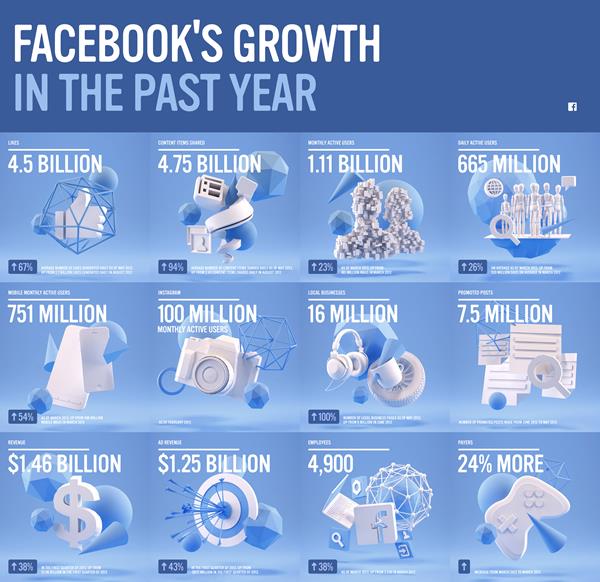
FBGrowthGraphic_V2

These tools will become available for other media partners and Facebook Preferred Marketing Developers in the near future. The benefit for Facebook is that it is likely to be used far more in coverage of news and events, alongside the existing usage of Twitter.

For individual use, Facebook is also testing the option for users to add Professional Skills to their personal profile – it’s similar to LinkedIn, allowing you to add list the skills you’ve acquired in your education and career. It’s currently available on a limited number of personal profiles during testing, and could then be rolled out to all users in the future.

Facebook updates rules for Facebook Page Promotions

August 28, 2013 By Dan Thornton

Facebook has made it easier to run promotions on Facebook, which is good news for all page owners. The requirement for all promotions to be run through dedicated applications has now been removed, meaning that you can promote your page and business on your Page Timeline as well as in an app.

That means you can:

  • Collect entries by having users post on the Page or comment/like a Page post
  • Collect entries by having users message the Page
  • Utilize likes as a voting mechanism

One area which Facebook has now tightened up on is tagging – the new Page Terms now prohibits Pages from tagging or encouraging people to tag themselves in content they are not actually in:

  • It’s OK to ask people to submit names of a new product in exchange for a chance to win a prize
  • It’s not OK to ask people tag themselves in pictures of a new product in exchange for a chance to win a prize

You can download the full Facebook Promotion Guidelinesas a PDF, here.

TheWayoftheWeb on Facebook
TheWayoftheWeb on Facebook – click to go and Like us.


Great news for small businesses:

This is particularly good news for smaller businesses who may not have had the knowledge or resources to choose a good Facebook Promotions or Competition App, or might have found the process to run it confusing.

While we’ve worked with several low cost Facebook Apps for this purpose, starting from a typical cost of $10, it can be slightly time consuming to set up, and dissuades brands from last minute offers, giveaways and competitions, which remains a prime reason for choosing to follow a company on Facebook.

And it will encourage more experimentation with promotions, which is only a good thing.


Also good for larger businesses:

It’s also good news for bigger companies, as often promotions and giveaways are constrained by time and effort, rather than budget and availability. This means that bigger Facebook pages will also be able to get more exposure and benefit from any contests and promotions which might be available last thing on a Friday, rather than missing the opportunity due to the hassles of setting up applications.


Top tip: Have boilerplate terms and conditions ready to go:

The one thing that all companies and promotions will still require are suitable terms and conditions to be legal in the country in which your business operates. Far too many companies fail to consider this in the planning stage and then find themselves unable to run offers and promotions, so it’s well worth investing some time and effort to ensure you have a standard boilerplate Terms and Conditions which can be easily changed to be applicable for any promotion, and possibly a longer version available via a link to your website.


Facebook rolling out option to Embed Posts

August 1, 2013 By Dan Thornton

Facebook has announced that you will soon be able to embed public posts within your website or blog. It’s launched the new feature with CNN, Huffington Post, Mashable, PEOPLE and Bleacher Report, and will apparently be rolling it out more widely very soon.

In use, it’s very similar to the process for embedding individual tweets into a blog or website. If a post is public (Shown by a globe icon), then it will be able to be embedded via an option in the drop down menu for any post, as shown in the following example:

You’ll then be shown some embed code to put into your page (in HTML view in WordPress for example). In addition to displaying in a reasonably nice way, the embed option also allows visitors to like, share, like the author page, and see shares and comments from within your website, rather than visiting Facebook.

Whether or not you want to use this option rather than embedding a screenshot image will depend on whether you want to allow your website visitors to interact in that way.

FacebookEmbeddedPostExample

But it’s certainly worth considering how you can use this alongside Facebook Open Graph and the Twitter equivalents to drive traffic to both your website and your social properties.

3 quick productivity tips for the weekend

March 17, 2012 By Dan Thornton

If you’re like me, you’ve probably skimmed through a variety of productivity tips every week, planned to take a closer look, and then forgotten about them by the weekend. But recently, I’ve made 3 key changes which have really helped my productivity by reducing the information overload we’re all experience between email, social networks and the constrant stream of new content being published.

1. Archive all emails older than 2012:

With the amount of emails I get on a daily basis, Inbox Zero seemed about as likely as taking a vacation in Narnia this year. Prior to the last two weeks, I’d kept trying to delete or respond all emails, but the number never seemed to drop below 1500 which was pretty overwhelming. By archiving I can reassure the librarian squirrel instinct in me the email is still searchable, but now I’ve got a far more manageable 200 emails left for 2012 to action or file for responses. Much less stressful, and suddenly my email looks more like an actual action list, rather than a mess.


2. Cut down on RSS:

RSS is not dead – it’s still the most effective content delivery system around. The problem is it’s too effective in allowing me to hoarde every possible website I enjoy, but noone has come up with a way to de-dupe the echo chamber that is particularly bad for tech blogs. So in addition to removing a number of sites I rarely get useful information or great entertainment from, I’ve also cut down on the number that constantly publish ‘me too’ coverage.

I’ve also resolved to only check RSS at the end of the day, when everything else is done or scheduled for the following day – I love keeping up with the latest news and the best articles and features, but I’m not running a site for breaking news, so I don’t really need to check RSS every 30 or 60 minutes these days.


3. Kill cross-platform duplication

I’ve suddenly realised that I read some sites via RSS, see their updates on Facebook and their tweets on Twitter, as well as an occasional appearance on Google+. And there are very few people in the world who I need to pay that close attention to.

I’ve finally been making use of the ‘Hide All By’ option next to every Facebook update, and it’s definitely helping in making it a more usable social network, and letting me actually use it to keep up with my friends. The brands I like still get a ‘Like’ for their page for what it’s worth, and I don’t have to be bombarded by updates from a 10-year-old film I listed on my profile years ago.


OK, so this isn’t the most comprehensive productivity toolset you’ll see, but importantly I’m getting much more done with probably 30 minutes of effort to archive emails, unsubscribe to some sites and hide some Facebook posts. That’s short enough that you don’t have to wait until next weekend to get it done…

  • Page 1
  • Page 2
  • Page 3
  • Interim pages omitted …
  • Page 15
  • Go to Next Page »

Primary Sidebar

Join us…

  • Facebook
  • Instagram
  • LinkedIn
  • RSS
  • Twitter

We only exist to deliver results for your business. So you get fresh Content, expert SEO, engaging Social Media, or a new Website which is right for you – and your customers.

We help you build your brand, reach more customers and increase your revenue

Search

Categories

Creative Commons License
This work by TheWayoftheWeb is provided under a Creative Commons Attribution-NonCommercial-ShareAlike 4.0 International License.

Start growing your business today Contact Us

TheWayoftheWeb

Copyright © 2026· TheWayoftheWeb Ltd. Company Number 08038527. ICO registration: ZB397650